HTTPS Analytics
The HTTP Traffic section under Metrics & Monitoring provides insights into application HTTP/API requests, CDN caching, bandwidth usage, and DNS query activity.
It helps developers and platform administrators understand how requests are handled, review traffic patterns, monitor caching efficiency, and investigate HTTP errors.
Accessing HTTPS Analytics
To view HTTP traffic analytics for an application:
- Navigate to the Applications page.
- Select the application to open its Application Details page.
- Open Metrics & Monitoring.
- Select HTTP Traffic.
HTTP Traffic Overview
The dashboard provides an overview of HTTP/API traffic and content delivery activity for the selected application and monitoring period.

Use the time-range selector to review traffic over the available periods. The dashboard also provides refresh and export controls where available.
Key Metrics
- Total API Requests – shows the number of requests recorded during the selected period.
- Cache Hit Ratio – indicates the proportion of eligible requests served from cache.
- Bandwidth Served – shows the amount of data transferred through the content delivery network.
- DNS Queries – shows DNS query activity associated with the application's traffic.
These indicators provide a high-level view of request activity, caching behavior, data transfer, and DNS usage.
Traffic Activity Over Time
The Traffic Activity Over Time chart displays changes in request volume across the selected monitoring period. Use the chart controls to switch between request activity and bandwidth data, where available.
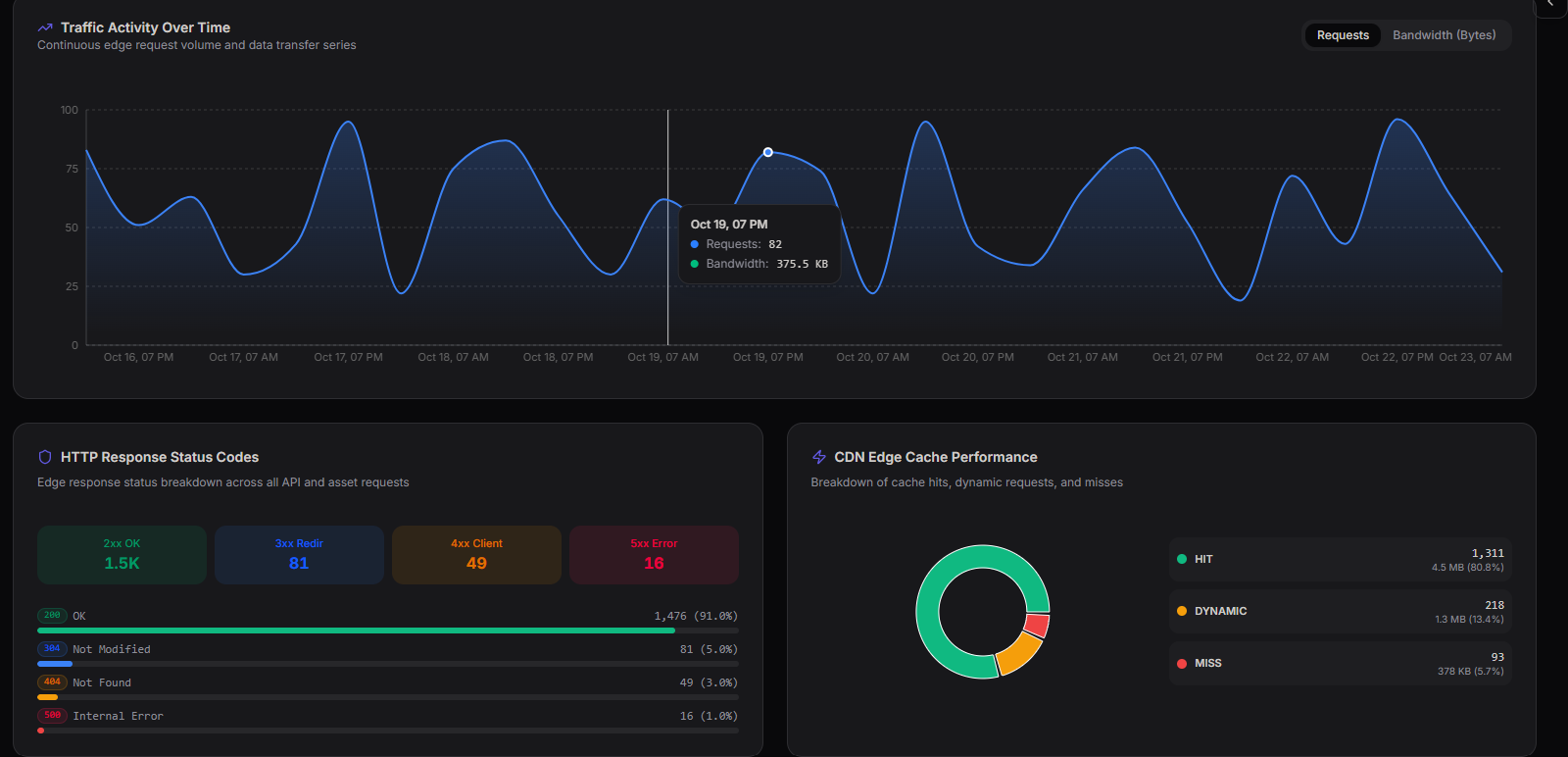
This chart helps teams:
- Identify increases or decreases in request activity.
- Review traffic patterns over time.
- Spot unusual changes in data transfer.
- Compare request volume with bandwidth usage.
HTTP Response Status Codes
The HTTP Response Status Codes section summarizes responses returned for API and asset requests.
It groups responses by HTTP status-code category to help identify successful requests, redirects, client-side errors, and server-side errors.
- 2xx Success – requests that were successfully processed.
- 3xx Redirects – requests redirected to another URL.
- 4xx Client Errors – requests that could not be fulfilled due to client-side issues, such as invalid requests or missing resources.
- 5xx Server Errors – requests that failed because of server-side or gateway-related issues.
Use this breakdown to investigate changes in request outcomes and identify categories that may require further troubleshooting.
CDN Edge Cache Performance
The CDN Edge Cache Performance section shows how requests are handled by the content delivery network cache.
It distinguishes between cache hits, dynamic requests, and cache misses, where those categories are available in the dashboard.
- Cache Hits – requests served from cached content.
- Dynamic Requests – requests handled dynamically rather than served from cache.
- Cache Misses – requests for which the requested content was not available in the cache and required further processing or retrieval.
Reviewing cache performance helps teams understand caching behavior and identify opportunities to improve content delivery efficiency.
Edge & Network Telemetry
The Edge & Network Telemetry view provides additional information about traffic and network activity collected at the edge.
Use the available charts and indicators to review relevant telemetry for the selected monitoring period and investigate changes in traffic or delivery behavior.
Summary
The HTTP Traffic dashboard provides a centralized view of application request activity, bandwidth usage, DNS queries, HTTP response statuses, and CDN cache performance.
It helps teams:
- Monitor HTTP/API request activity.
- Review traffic and bandwidth trends.
- Understand cache efficiency.
- Investigate HTTP response errors.
- Review DNS query activity.
- Analyze edge and network telemetry.
Regularly reviewing these metrics helps teams understand application traffic behavior and investigate potential request, caching, or delivery issues.