Cloud Accounts Management
The Cloud Accounts management module (/cloud-accounts) centralizes credentials, IAM roles, and authentication tokens across hyperscale cloud providers. Connecting your cloud accounts enables Nife to orchestrate Kubernetes clusters, provision virtual machines, and manage cloud resources directly inside your own private cloud tenancy (Bring Your Own Cloud - BYOC).
Overview
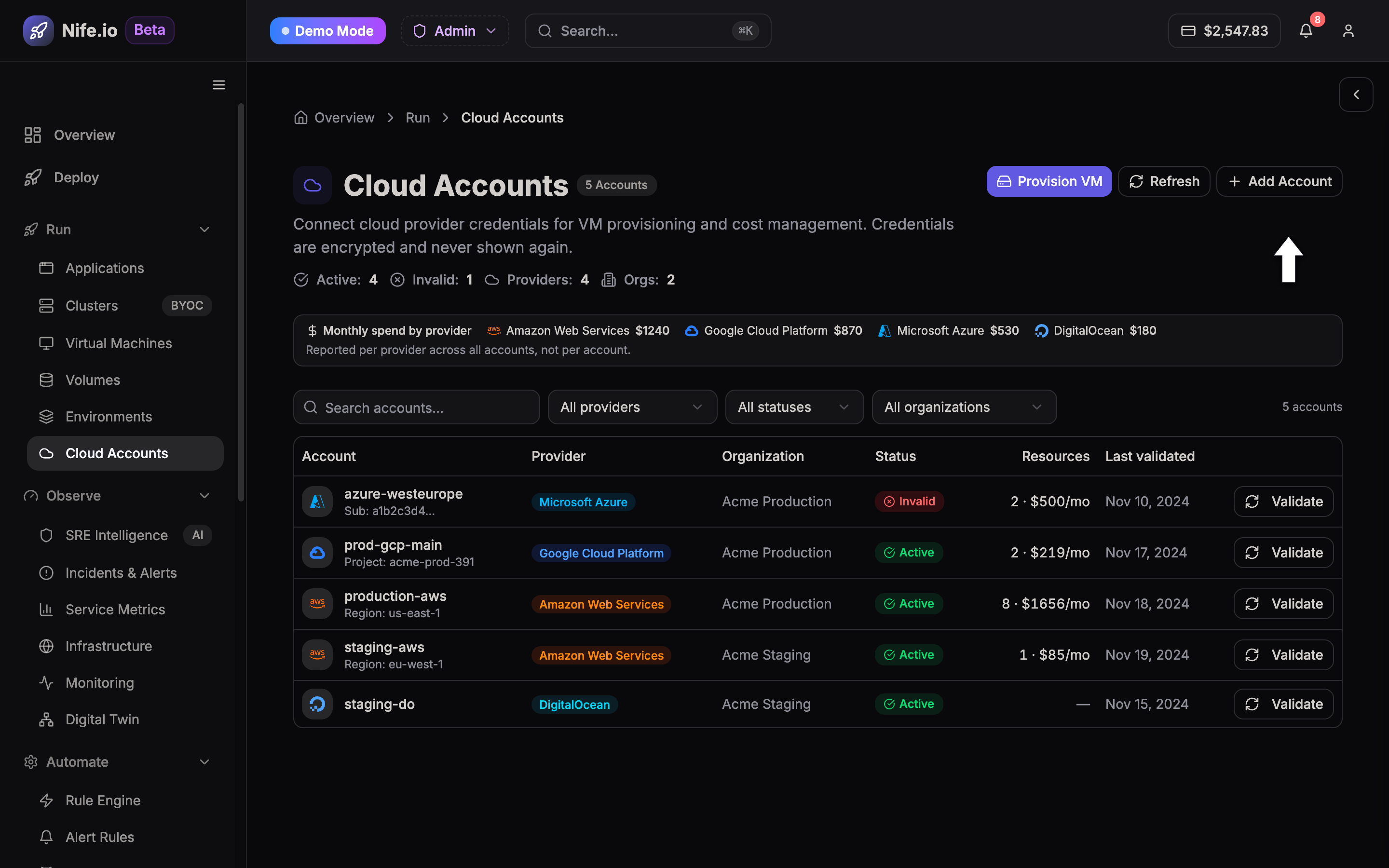
The Cloud Accounts dashboard displays all connected provider environments, credential validation status, linked clusters, and active resource counts.
Supported Cloud Providers
Nife natively supports credential integration and IAM policy automation for:
- Amazon Web Services (AWS): Secure cross-account IAM Role authentication with External ID validation.
- Google Cloud Platform (GCP): Workload Identity Federation or Service Account JSON keys.
- Microsoft Azure: Azure Active Directory (Entra ID) App Registrations with Service Principal Client Secrets.
- Oracle Cloud Infrastructure (OCI): User OCID, Tenancy OCID, and API signing key pairs.
Connecting a New Cloud Provider
To connect a provider account:
- Navigate to Cloud Accounts (
/cloud-accounts) from the left navigation bar under the Run / Infrastructure pillar. - Click Connect Cloud Provider in the top right corner.
- Select your cloud provider from the modal:
AWS Connection Workflow
- Authentication Method: Select IAM Role (Recommended) or Access Keys.
- Role ARN: Provide the ARN of the IAM role configured in your AWS account (e.g.,
arn:aws:iam::123456789012:role/NifeOrchestrationRole). - External ID: Enter the unique tenant External ID provided in the Nife console to establish a secure cross-account trust relationship.
- Permissions Required: Ensure the role attaches policies for Amazon EKS (
eks:*), VPC networking (ec2:*Vpc*), and CloudWatch logging.
GCP Connection Workflow
- Project ID: Specify your target Google Cloud Project ID.
- Service Account Key: Upload your JSON key file containing the
service_accountcredentials. - Required Roles: Assign
Kubernetes Engine AdminandCompute Network Adminto the service account.
Azure Connection Workflow
- Subscription ID: Your active Microsoft Azure Subscription ID.
- Tenant ID: Directory (tenant) ID from the Azure Portal.
- Client ID & Secret: Application ID and active secret value for your registered enterprise application.
Security & Credential Isolation
- Zero Secret Exposure: Credentials and private keys are encrypted in transit using TLS 1.3 and stored at rest using AES-256 in dedicated KMS vaults.
- Least Privilege Access: Cloud accounts can be scoped with read-only permissions for telemetry and analysis or full provisioning permissions for cluster autoscaling.
- Automated Health Checks: Nife periodically validates credential health and notifies administrators if an IAM role or secret expires.