Templates
The Templates system allows you to manage and deploy reusable configurations, ensuring consistency across different environments and teams.
1. Templates vs. Marketplace
The dashboard is divided into two primary sections:
- Templates: Reusable configurations created and owned by your organization.
- Marketplace: Pre-configured, industry-standard applications ready for instant deployment.
To create a new custom configuration, click the + Add Template button in the top right corner.

2. Creating a New Template
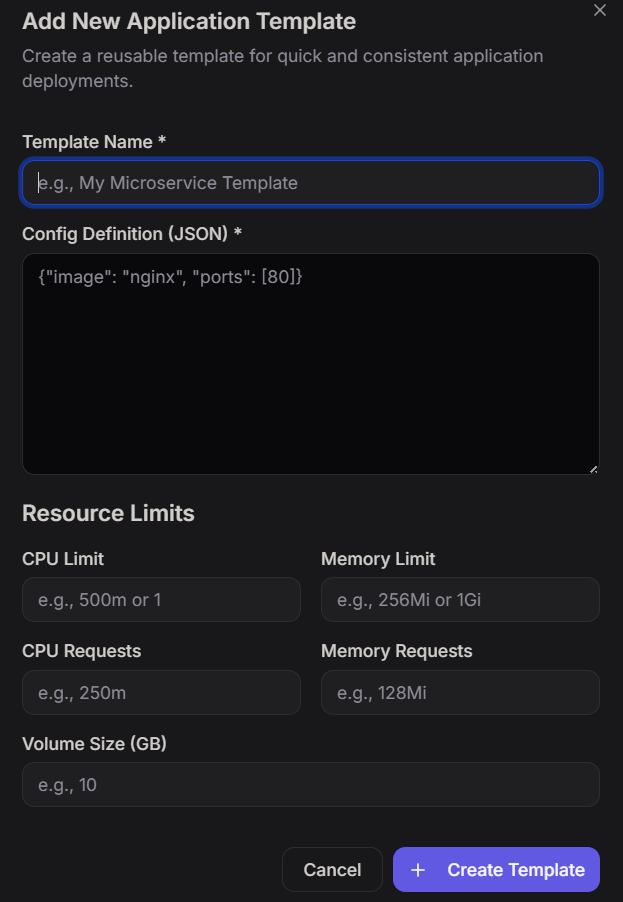
When adding a new template, you define the core blueprint that all future instances of that application will follow.
Required Fields
- Template Name: A unique identifier for the configuration (e.g.,
My Microservice Template). - Config Definition (JSON): A standard JSON object defining the container image and ports (e.g.,
{"image": "nginx", "ports": [80]}).
Resource Limits
Define the hardware constraints for applications using this template:
- CPU: Specify limits (e.g.,
1) and requests (e.g.,250m). - Memory: Specify limits (e.g.,
1Gi) and requests (e.g.,128Mi). - Volume Size: The amount of persistent storage required in GB.
3. Quick Deploy from Marketplace
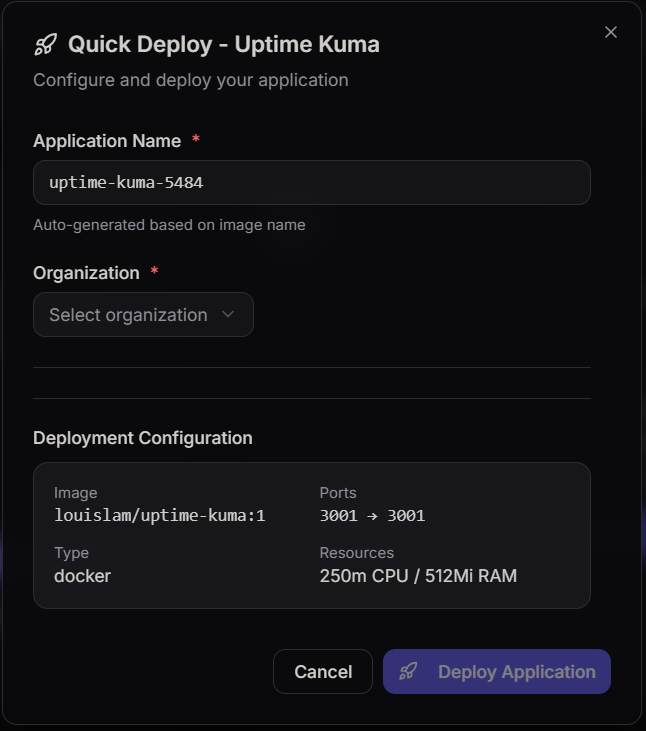
The Marketplace allows for "one-click" deployments of popular tools, such as Uptime Kuma.
Configuration Steps
- Application Name: Automatically generated based on the image name, but can be customized.
- Organization: Select the target organization for the deployment.
- Deployment Configuration Review: Before launching, the system displays a summary of the deployment specs:
- Image: The Docker registry path.
- Ports: Internal and external port mapping.
- Resources: Pre-set CPU and RAM allocations.
Launching the Application
Once the organization is selected and the configuration is reviewed, click Deploy Application. The system will provision the necessary infrastructure and start the container based on the template logic.
4. Use Cases
- Standardization: Ensure every "Node.js" app in your company uses the same base image and security settings.
- Rapid Prototyping: Use the Marketplace to spin up monitoring tools (Uptime Kuma), databases, or CMS instances in seconds.
- Resource Governance: Hardcode CPU and Memory limits into templates to prevent individual applications from consuming excessive cluster resources.