OneClick Site Deployment
Deploy static websites directly from GitHub, GitLab, or Bitbucket using Nife OneClick Site Deployment.
Step 1: Start Site Deployment
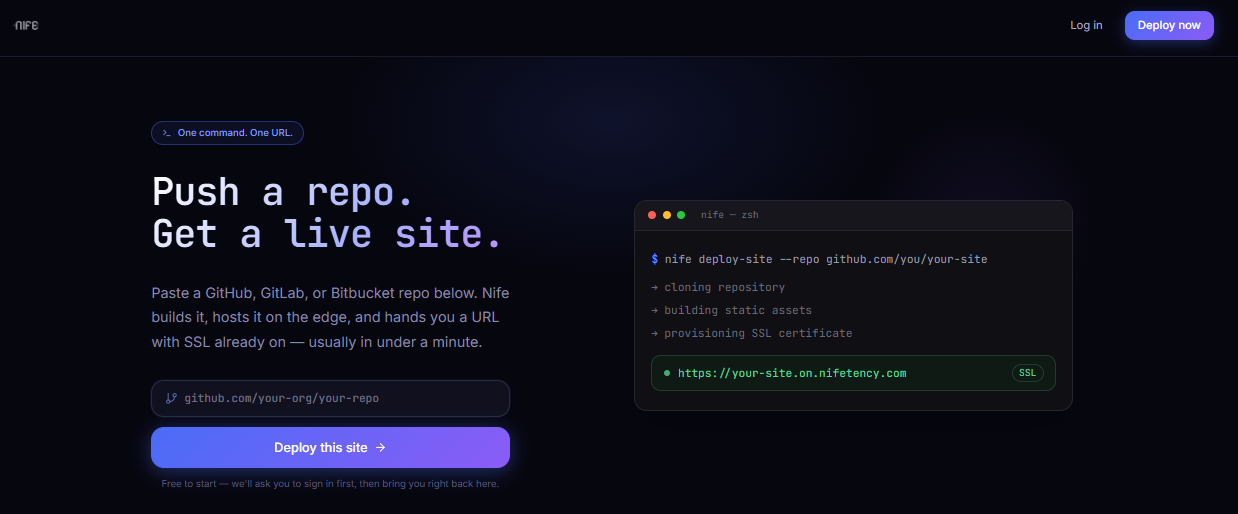
- Open the Deploy on Nife page.
- Paste your Git repository URL.
- Click Deploy this Site.
Nife automatically detects your repository and redirects you to the Site Deployment configuration page.
info
Supported frontend frameworks include:
- React
- Vue
- Angular
- Astro
- Vite
- Next.js (Static Export)
Step 2: Configure and Deploy
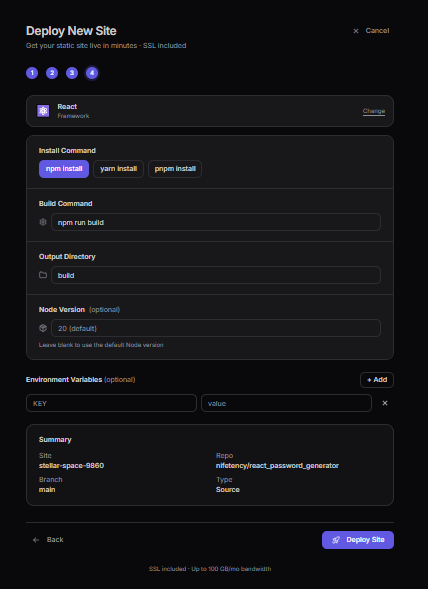
Review or modify the detected configuration.
Configure the following settings:
- Framework
- Install Command
- Build Command
- Output Directory
- Environment Variables (Optional)
Review the deployment summary, including:
- Site Name
- Repository
- Branch
- Deployment Type
Click Deploy Site.
tip
Nife automatically detects your frontend framework and pre-fills the recommended build configuration. You can modify these settings if required.
Step 3: Deployment Complete
During deployment, Nife automatically:
- Clones your Git repository
- Installs project dependencies
- Builds the application
- Generates production assets
- Deploys the site to the edge
- Configures HTTPS/SSL
- Generates a public URL
success
Your static site has been successfully deployed and is ready to share.
Next Steps
After deployment, you can:
- Configure a custom domain.
- Monitor deployment logs.
- Redeploy from the latest Git commit.
- Set up GitHub Actions for automatic deployments.